
April Newsletter: QSApp Store Launched!🚀
Interactive Content Creation Just Got Easier—Here’s How!

In This Post 👇
- QSApp Store officially launched—subscription process now quicker & easier🎉
- More ready-made QSApp templates to jumpstart your interactive web content🧩
- New updates & improvements across UI Editor and Machine Editor🛠️
After a whirlwind of industry events this spring, April gave us a rare moment to catch our breath. But even with fewer events on the calendar, we’ve been busy behind the scenes—especially when it comes to making QSApp even easier to access and use.
Following the inspiring and in-depth conversations we had with potential customers last month at SXSW in Austin and GDC in San Francisco, we took your feedback to heart. Many of you told us you wanted an even simpler, faster way to get started with QSApp—and in April, we delivered!
👉 We Officially Opened the QSApp Store!
When we first introduced QSApp at Slush 2024 last November, we kicked things off with a small group of pilot customers, gathering insights to make QSApp the best no-code tool for creating interactive web content. Thanks to their feedback, we’ve now launched a quick, seamless path to start your QSApp journey.
So, whether you’re a designer, marketer, content creator, or anyone looking to build interactive web experiences without code, this is your tool!🫵

Where once getting started required reaching out directly to us, the process is now as simple as:
- Heading to qs.app
- Clicking “Get Started”
- Selecting the subscription that fits you best
- Entering your details securely via our trusted FastSpring payment system
✅ And yes—new QSApp customers get a 30-day free trial!
Once you’re signed up, you can immediately download our three powerful tools: UI Editor, Machine Editor, and QSApp Editor. Follow our step-by-step tutorials, or dive right in using our ready-made QSApp templates to start publishing your own interactive web content within minutes.
✨ Ready-Made QSApp Templates—Your Quick Start to Interactive Content
Speaking of QSApp templates—well, “but wait, there’s more” definitely applies here. Based on research and requests from our early users, we’ve created a growing list of ready-made QSApp templates featuring some of the most common interactive elements you’ll find on websites today.
From different button interactions (how buttons respond when clicked), to progress bars, star rating systems, and even interactive banners and ads—these templates are designed to help you hit the ground running.
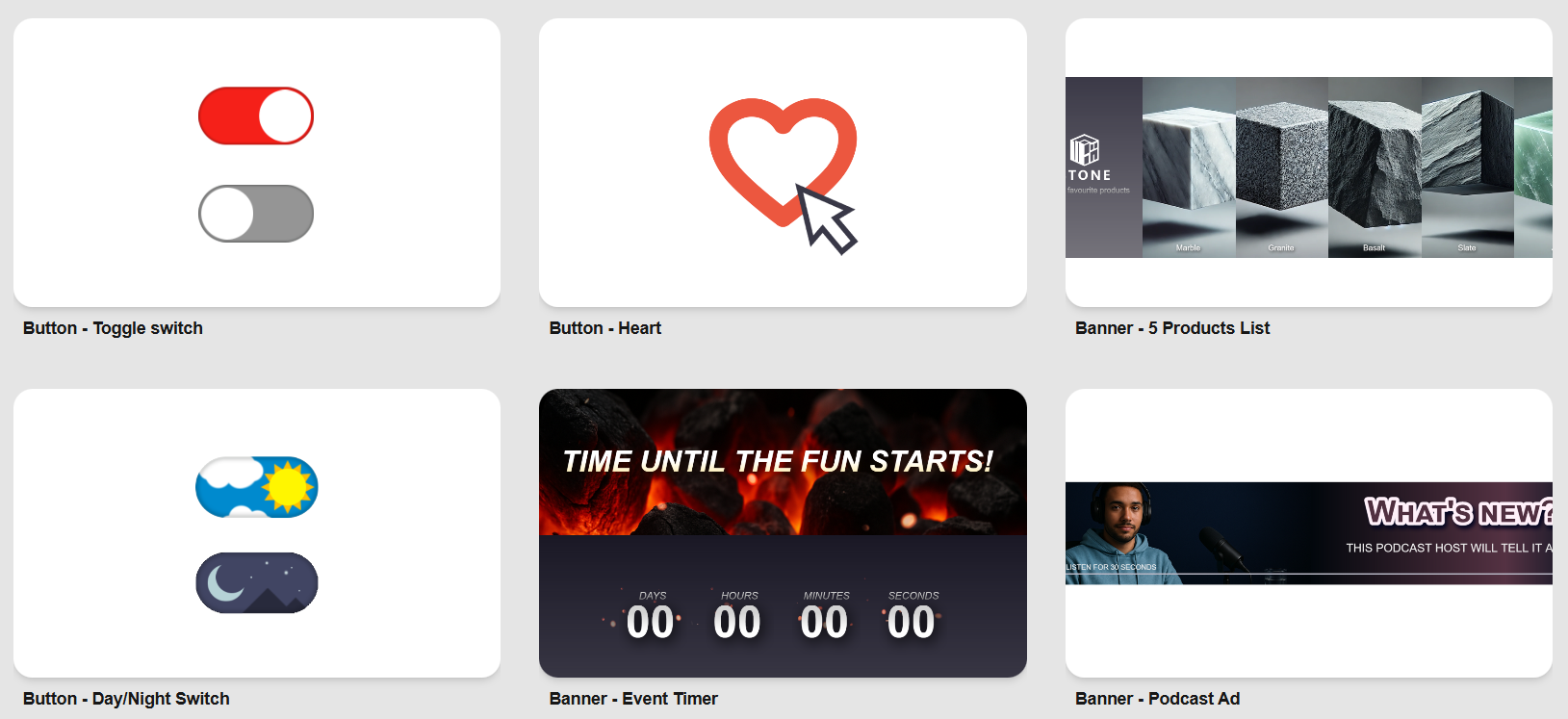
If you’re in a hurry and just want to get your content live fast, no problem.
Simply swap out the graphics with your own branding, hit “Publish” in the QSApp Editor, and you’re ready to roll.
Adding your published QSApp to your website is just as easy:
- Take the generated ID from your QSApp URL
- Add it to your website’s source code with a single line of code—and your interactive content is live and embedded instantly.✅
These templates aren’t just shortcuts—they’re also fantastic starting points for custom designs. Use them as a launchpad to craft your own unique, eye-catching interactive experiences. Honestly? The sky’s the limit.
And when you’re ready to show off what you’ve built, we’d love to see it! Tag your QSApps on social media with #MadeWithQSApp so the entire QSApp community can admire your work.
🛠️ Editor Updates:
April brought another round of improvements and fixes to our beloved UI Editor and Machine Editor, with not one but two fresh releases:
🎨UI Editor v2.102.0 (on 2nd of April)
This release focused on making the Editor smarter and easier to use, especially for anyone working with complex Spine files.
💎 Improvements:
- Added a filterable autocomplete dropdown to the Spine Node animation fields, making it way easier to sort through long animation lists.
- Renamed the Node tab → Node Properties for better clarity.
🐞 Fixes:
- Fixed an issue on Mac where pop-up dialogs could take over the whole screen and block Editor use while in full-screen mode.
🎨UI Editor v2.103.0 (on 11th of April)
This update was all about security and smoother workflows:
💎 Improvements:
- The Editor is now secured with a Windows code signing certificate, so Microsoft Defender recognizes it as a trusted product of Quicksave—goodbye unnecessary security warnings!
- Made it easier to change the color of Text elements by automatically showing the fill property when creating a new Text element.
⚙️Machine Editor v1.90.0 (on 2nd of April)
This release mirrors some of the improvements we introduced in the UI Editor, focused on better usability for complex state machines:
💎 Improvements:
- Added a filterable autocomplete dropdown to State Node Actions and Activities for easier navigation in large projects.
- Renamed Node tab → Node Properties for clarity.
🐞 Fixes:
- Fixed the same Mac pop-up dialog issue that could block use while in fullscreen mode.
⚙️Machine Editor v1.91.0 (on 11th of April)
💎 Improvements:
- The Editor is now secured with a Windows code signing certificate, ensuring Microsoft Defender recognizes it as a trusted Quicksave app, bringing the same enhanced security as the UI Editor update.
With the QSApp Store now open, new templates live, and our Editors stronger than ever, we’re excited to see what you’ll create next. We’re working hard behind the scenes, gearing up for more improvements, more showcases, and more ways to help you bring interactive web content to life.
Stay tuned—there’s plenty more in store. 🌼🚀
Catch you next month—until then, wishing a sunny spring!
🧡 Karo from Quicksave
Find & Contact us:
⚡️ QSApp Website - Explore live demos, get product insights, and check out pricing info for QSApp.
🌐 Quicksave Website - Learn more about Quicksave Studio, the Quicksave Toolkit, and everything we do across games and tech.
💼 LinkedIn - Catch our latest news, behind-the-scenes peeks, and updates on team life and culture.
📽️ YouTube - Watch Toolkit tutorials, product walkthroughs, and the occasional fun side project from our team.
Quicksave Interactive is a Finland-based company specializing in cutting-edge WebGL/HTML5 UX technology. Quicksave develops and licenses QSApp, which empowers designers and artists to create and embed interactive web experiences without coding. In addition, Quicksave's internal studio develops and publishes interactive WebGL products like games, including Treasure Tails on Facebook, Werewolf Friends inside Zoom, and Axie Infinity: Raylights on Ronin blockchain.